Tutored: Connecting Students With the Right Tutors

〰️
UX Research
〰️
UX/UI Design
〰️
Prototyping
〰️
Usability Testing
〰️
Wireframing
〰️
Journey Mapping
〰️
Mockups
〰️ UX Research 〰️ UX/UI Design 〰️ Prototyping 〰️ Usability Testing 〰️ Wireframing 〰️ Journey Mapping 〰️ Mockups
Designing a Better Tutoring Experience

Designing an Easier Way to Find Tutors
Create an app and responsive website that are easy to use, and let you explore and book tutors that best cater to the student so they can achieve their goals.
Responsibilities
Conducting user research
Conducting interviews and usability studies
Creating paper and digital wireframes
Creating low and high-fidelity prototypes
Iterating on designs based on user feedback
The Product
Tutored is an app that lets you find tutors for all education levels. Users are able to explore tutors and book sessions with them. This is an applied project for my Google UX Design Professional Certificate.
The Challenge of Finding the Right Tutor
Students often have the issue of finding a reliable tutor because the way they approach a certain topic may be different from the way the schools do, causing some confusion and frustration with the students.
Duration
November 2021 to December 2021
Tools Used
Figma, Miro, Procreate


Understanding Students and Tutors
I conducted interviews and created personas to better understand students and tutors. The research focused on high school and university students who had previous tutoring experience, as well as tutors and how they prepare lessons and manage bookings.
The findings confirmed a key issue: students often struggle to find tutors who match their learning style. Many rely on word of mouth and are unsure if a tutor will be the right fit. This was also a challenge I personally experienced when using tutors in the past.

Personas


Adam’s Problem Statement
Adam is a mechanical engineering student who needs to find a reliable tutor because he needs to perform well on his thermodynamics exam.
Leila’s Problem Statement
Leila is a high school student who needs to find a reliable tutor because she needs to perform well on her chemistry test.
Ideation
Initial sketches were explored and then transferred to Figma.


user flow
A user flow was created to illustrate the app’s general navigation, having 4 major tabs.

Low-fidelity prototype
A low-fidelity prototype was created to see how easy it is for users navigate through the app to find and book a tutor. This prototype would later be used on a select group of users for usability testing. Findings from this study helped me guide my designs into the mockup stage using actionable insights.

Usability study
Parameters Findings
Study Type
Moderated usability study
Participants
6 participants
Location
Canada, remote
Length
15 - 20 minutes
Some users wanted a clearer search bar
Some users thought the information layout needed some restructuring
Tutors would like do the bookings on their end rather than having students book session slots

High-fidelity Prototype
After creating high-fidelity mockups, I conducted a second study that used a high-fidelity prototype and revealed what aspects of the design needed refining based on user feedback.

Mockup Refinements
One example is the tutor thumbnail in the search results; most users preferred to see the tutors’ field of study and what they can teach rather than their profile description.
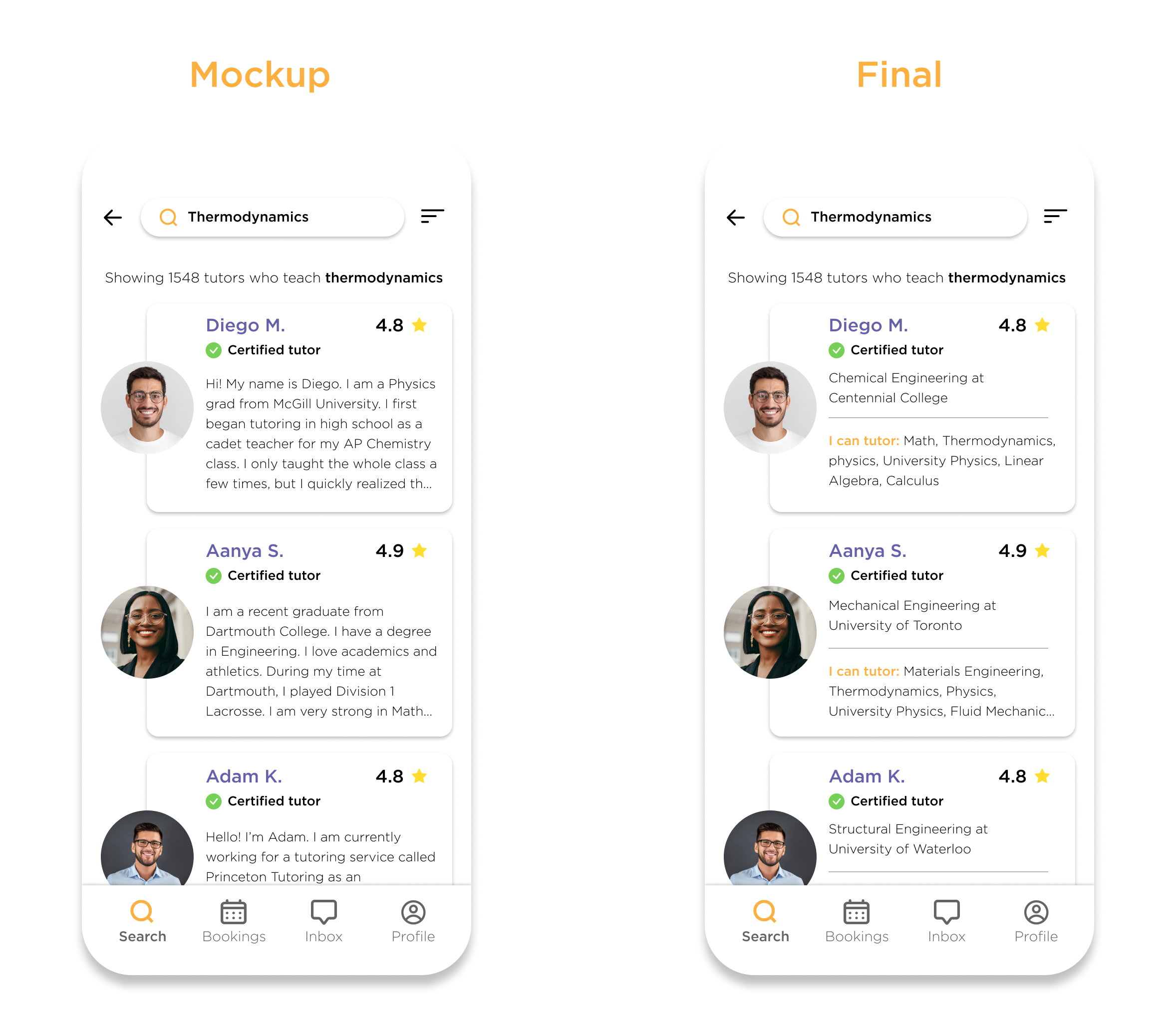
final design
The final design of the app uses a simple and elegant design with a welcoming feel by incorporating illustrations and a visually appealing color scheme.


Alternative booking method
I created a different way for users to book a tutor by choosing dates and time slots when the selected tutor is available. Bookings would be done 3 days in advance to let the tutors have time to revise course material for the students.
After interviewing tutors, most prefer to book the sessions themselves by choosing their own preferred dates and time rather than having students book sessions on their end.


Accessibility considerations
I included search filter options where users can search for tutors who can teach students with learning disabilities, as well as a dark mode to reduce eye strain.

Sitemap
After finalizing the mobile app, it was time to work on the responsive website version, where I first created a sitemap of the general navigation.

Website Designs


Impact
The final product proved to be an overall user-friendly experience among the participants, with many pointing out that user interfaces are well laid out. Usability studies and peer feedback helped me iterate on the development of the prototypes.
What I learned
I really enjoyed figuring out different ways to book a tutor and making the app feel approachable to everyone who needs tutoring. I also learned how to design for different screen methods using the progressive enhancement method.
Next Steps
Conduct follow-up usability testing on app and website
Work and iterate on any additional areas that are in need of improvement
Reassess and decide whether project is complete or subsequent usability testing is needed